Posts

Linq to Entities and Custom Database Functions
Image
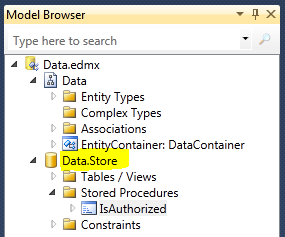
I've been using Linq to SQL since it came out. Linq to Entities didn't have any compelling functionality, and it was far less supported in the development community. Nobody seemed to be using it. For whatever reason, when the language group at Microsoft came out with Linq, the data group was slow on the uptake and that left the language group with the need for an actual database query layer, so Linq to SQL was born. There were rumors that Linq to SQL would not continue to evolve, but it certainly worked fine for what I needed. The 2009 Microsoft PDC had all kinds of interesting things, but absolutely nothing regarding Linq to SQL. The language group became enammored with .NET 4 and the dynamic language features and have apparently orphaned Linq to SQL. Not so the data group. The improvements to Linq to Entities seem to breathe new life into what had previously been a "me too" implementation of Linq. Certainly the biggest news about Linq to Entities relates to the new ...

jQuery and MVC Autosuggest while saving the selected Id

Yea, I know, boring title. But I really want to make sure I can find the code for how to do this one. jQuery is very cool. All the eye candy is nice, the syntax is excellent, but the real benefit is AJAX... The autocomplete jQuery library is extremely nice. It allows you to take a Json result from some url and suggest results to a text box. What I want is for the selected value to populate another input field (hidden) so that I have a real foreign key relationship to the item they selected. here's the html: <input class="location" id="LocationName"> <input id="LocationId" type="hidden" keyFor="LocationName"/> Or alternately you can use Html Helpers <%= Html.TextBox("LocationName", null, new {class = "location"}) %> <%= Html.Hidden("LocationId", null, new {keyFor = "LocationName"})%> and here is the supporting javascript: $(document).ready(function() { $('.loc...

It's all about presentation...

My last post, you may notice has code snippets that look somewhat professional. I found a cool online tool called Code2html It turns this: using System; using System.Collections.Generic; using System.Linq; using System.Web; using System.Web.UI; using System.Web.UI.WebControls; using System.Net.Mail; public partial class _Default : System.Web.UI.Page { protected void Page_Load(object sender, EventArgs e) { } protected void Button1_Click(object sender, EventArgs e) { MailMessage message = new MailMessage("FROM@domain.foo", "TO@domain.foo", "SYNCHRONOUS MESSAGE", "MESSAGE BODY"); SmtpClient smtp = new SmtpClient(); smtp.Send(message); } protected void Button2_Click(object sender, EventArgs e) { MailMessage message = new MailMessage("FROM@domain.foo", "TO@domain.foo", "ASYNCHRONOUS MESSAGE", "MESSAGE BODY"); SmtpClient smtp = new SmtpClient...

You had me at ehlo!

Image
It seems that a lot of websites send users email for lots of reasons. This introduces a bit of a problem when you are developing applications because as developers we don't necessarily want to put an smtp server on our development machine and network administrators are fairly selective about the open SMTP relays that they want on their network. ASP.net has a solution, and I have a solution. The asp.net solution is that the web server where your application will eventually live can (will) have a single machine configuration for the smtp settings. Every application can override this setting in the web.config file, but should actually just comment out the < mailsettings > section. During development, however, this configuration is useful: < configuration > < system.net > < mailSettings > < smtp from= "admin@foo.bar" deliveryMethod= "SpecifiedPickupDirectory" > < specifiedPickupDirectory pickupDirectoryLocation= "C...

ATLAS AJAX Control Toolkit AutoCompleteExtender with Key Lookup

I like the ATLAS AJAX Control Toolkit. It integrates with Visual Studio and has useful if not basic javascript functions that can help a website be much more interactive. The AutoComplete Extender is used to provide auto-complete functionality to a text box. To use it, you simply add an extender and a web service method that provides a list of strings based on the text that the user started typing. So, if you are trying to provide the exact string that the user is typing (ala google search help), you can use it out of the box. However, sometimes you want more list-ish functions, that is, you want to present the user with a list of valid choices that represent objects, not just the descriptions. One alternative is to use a Listbox with a ListSearch Extender. This extender is used to find an existing value within the listBox. The downside to this approach is that every item you are looking for has to be in the list. This can be rather unwieldy if the list has more than a couple dozen i...

IBM x335 and Windows 2008 installation

I love the fact that IBM stops supporting its hardware long before Microsoft does; this means that lots of top-tier companies have to decommission their *somewhat* old hardware and you can pick up a server cheap (or free) to play with at home. It may mean, however, that your installation mileage may vary. Such has been the case for my IBM x335 (of which I have three). I've been on a quest to do an installation of Windows Server 2008 on said boxen. (plural of ox is oxen, plural of box is...) How fickle a lover are antique hardware and modern operating systems? How doest thou vex me, let me count the ways... Windows 2008 only comes on DVD while an IBM x335 has only a CD and will not boot from USB. Windows 2008 will not install from any sort of DOS utility disk. So Bart's Network boot disk is out, likewise a network boot to anything based on DOS. The IBM x335 has an internal IDE that is used by its CD Rom. You can crack the case and use an internal DVD drive from some other comput...

New cool tool

Oh, by the way, I have to give some credit to Notepad++ for that last post. The asp.net was HTML encoded using Notepad++ (TextFX TextFX Convert Encode HTML). I keep Notepad++ on a USB drive using PortableApps . It has lots of cool tools that are handy to keep with you or keep personal like KeyPass portable, but that's another post!